

We may earn a commission when you buy through links on this page, at no extra cost to you. It never decides what we recommend. How we make money
Knowing how to charge a car battery at home saves you a tow, a jump from a stranger and a guess at the parts store. You need a plug-in battery charger, a wall outlet and about ten minutes of hands-on work. The charger does the rest overnight.
This guide is for US drivers with a standard 12-volt car battery and a garage or driveway. You will learn the clamp order the manuals actually call for, which charger setting matches your battery, how long it takes, and how to tell when it is full. We checked every step against charger manuals from Battery Tender and NOCO and against Interstate Batteries’ own guide, and we point out where those sources disagree.
How to charge a car battery: the short answer
- Ventilate Work in an open garage or driveway, engine and accessories off, glasses and gloves on.
- Check it Do not charge a battery that is cracked, leaking, swollen or frozen.
- Red first Clamp the red lead to the battery’s positive (+) post.
- Black second In the car, clamp black to bare chassis or engine metal away from the battery, unless your charger’s manual says the negative post.
- Pick the mode Match the setting to the battery label: standard, AGM or lithium.
- Plug in last Connect AC power after the clamps, then let a smart charger run until it shows full.
- Unplug first Pull the AC plug, then remove black, then red.
What you need to charge a car battery at home
The list is short. The one item that matters most is the charger, because a modern automatic charger stops on its own when the battery is full. An old manual charger does not, and that is how batteries get boiled.
If you see white or blue-green buildup on the clamps, follow our guide on how to clean car battery terminals so the charger clips bite into bare metal.
- A 12V automatic (smart) charger. Look for a mode that matches your battery type. Our guide on how to choose a car battery charger covers the checks that matter. Our best car battery charger picks passed those checks.
- The right amps. A 4 to 10 amp charger suits most cars. Our battery charger sizing guide works it out from your battery’s amp-hours.
- Safety glasses and gloves. Battery acid and sparks are the two real hazards here.
- A wire brush or terminal cleaner if the posts are crusty.
- A multimeter (optional) to check voltage before and after.
- Your car’s owner’s manual. Some cars list a specific charging or ground point under the hood.
Checks before you charge
Two minutes of checking prevents the only truly dangerous outcomes. Lead-acid batteries give off hydrogen while charging, and the Battery Tender manual warns that batteries generate explosive gases during normal operation. So the first rule is air: work with the garage door open, never in a closed room.
- Look at the case. If it is cracked, leaking, bulging or wet with acid, stop. That battery needs replacing, not charging.
- Check for freezing. The Battery Tender manual says plainly never to charge a frozen battery. If the car sat dead through a hard freeze and the case looks swollen or the battery feels solid-cold, bring it inside to thaw to room temperature first, or replace it.
- Read the label. Find whether it is a standard flooded, EFB, AGM or lithium battery. If you are unsure, our AGM vs flooded battery guide shows how to tell them apart.
- Measure the voltage if you have a meter. Our car battery voltage chart converts the reading to a rough state of charge.
- Turn everything off. Ignition off, key out, lights and accessories off.
Should you charge it in the car or take it out?
Most people can leave the battery in the car. The Battery Tender manual gives a full procedure for charging a battery that is still installed, and smart chargers are built for it. Taking it out makes sense in a few cases.
| Your situation | Better choice | Why |
|---|---|---|
| Normal car, battery under the hood, smart charger | Leave it in | Manuals cover in-car charging; no reset of radio or memory settings |
| Battery in the trunk or under a seat | Check the owner’s manual | Many of these cars have remote charging posts under the hood |
| Terminals badly corroded or loose | Take it out and clean | A poor clamp connection slows or stops charging |
| Using a repair or desulfation mode | Disconnect it from the car | NOCO’s manual says to disconnect the battery first to protect the vehicle’s electronics |
| Car parked on the street, no outlet nearby | Take it out | Never run an extension cord across a sidewalk or leave a charger in the open |
Where the sources disagree: Interstate’s guide suggests disconnecting the car’s negative cable before you charge. The Battery Tender manual instead gives an in-vehicle procedure that keeps the battery connected. Both are reasonable. If you leave it connected, follow the clamp order below closely. If you disconnect it, expect to reset the clock and radio presets.
How to charge a car battery step by step
These steps follow the in-vehicle procedure in the Battery Tender manual, which matches what most charger manuals say for a negative-ground car. Nearly every modern car sold in the US is negative ground. Your own charger’s manual always wins if it says something different.
- Keep the charger unplugged and any switches off. Set it on a stable surface as far from the battery as the cables allow, never on top of the battery.
- Clean the posts if you see white or green crust, so the clamps bite bare metal.
- Connect the red clamp to the positive (+) post. The positive post is marked POS, P or + and is usually the larger one.
- Connect the black clamp to bare metal on the chassis or engine block, away from the battery. Avoid the fuel lines, carburetor and thin sheet-metal body panels. The final connection is where a small spark can happen, so it should be away from any gas around the battery. Some chargers, including NOCO’s, also allow the black clamp on the negative post; check your manual.
- Choose the mode that matches your battery (see the next section). Many smart chargers detect voltage automatically but still need you to pick the battery type.
- Plug the charger into the wall outlet. NOCO’s manual says not to connect AC power until all other connections are made.
- Let it run. A smart charger moves through its stages on its own. Check on it now and then; Interstate advises against connecting a charger and walking away for the day.
- Stop if something is wrong. Interstate lists a rotten-egg smell, hissing or a hot case as signs to turn the charger off.
- Disconnect in reverse: unplug from the wall first, then remove the black clamp, then the red clamp.
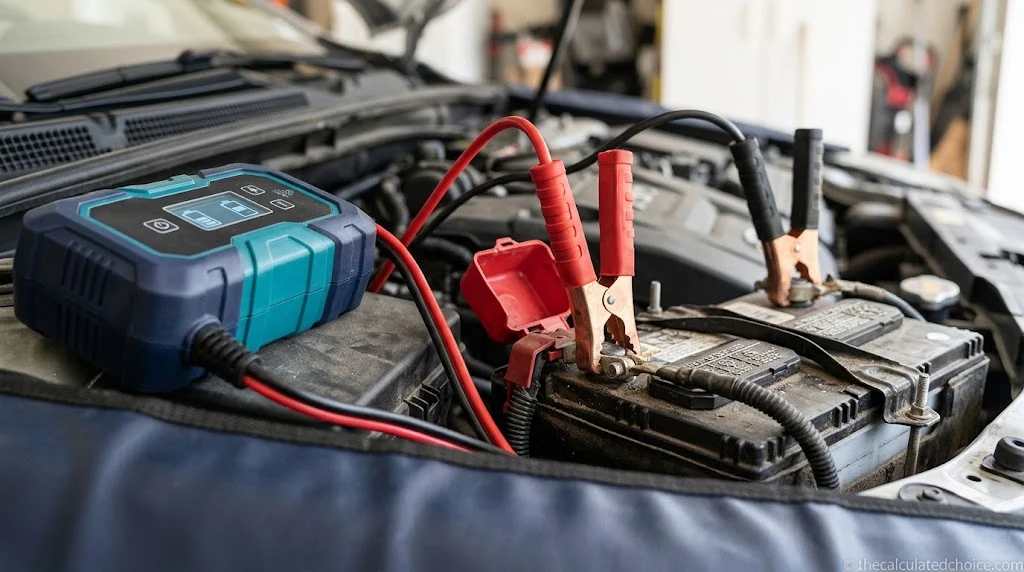
Battery out of the car? The procedure changes slightly. The Battery Tender manual says to fit at least a 24-inch, 6-gauge insulated cable to the negative post, connect red to positive, step back, then connect black to the free end of that cable, without facing the battery. Set the battery on a clean, dry surface in a ventilated spot.
Which charger setting to choose
Picking the wrong mode is an easy mistake to make. Interstate warns that the wrong battery-type setting can damage the battery. Use the label on top of the battery, not a guess based on the car’s age.
| Battery label says | Typical charger mode | Example finishing voltage (NOCO manual) |
|---|---|---|
| Flooded, wet, maintenance-free, calcium | 12V Normal / Standard | 14.5V |
| EFB (enhanced flooded, start-stop) | 12V Normal, unless your charger has an EFB mode | 14.5V |
| AGM | 12V AGM (NOCO combines it with Cold) | 14.8V |
| Lithium / LiFePO4 | 12V Lithium only | 14.2V |
| Old, sulfated lead-acid | Repair mode, battery disconnected from the car | Up to 16.5V, so never with the battery connected |
Those voltages come from one NOCO GENIUS manual. Other brands use slightly different numbers, so treat the column as a guide to the pattern, not a spec for your charger. Interstate also notes a charger should never push a car’s system to 16 volts, which is why repair modes are only for a battery that is off the car. If your battery is lithium and your charger has no lithium mode, do not charge it with that charger.
How long does it take to charge a car battery at home?
Interstate gives a useful range for a smart charger: roughly 4 to 8 hours to put in enough charge to start the car a few times, and 10 to 24 hours to reach a full charge. A small trickle charger of an amp or two can take days. The math below shows why the range is so wide. For a full table at 2, 10 and 40 amps, see how long to charge a car battery.
Hours to charge ≈ amp-hours to replace ÷ charger amps × 1.2
Example battery: 60 Ah, measured at about 50% (12.2V on our voltage chart) = about 30 Ah to put backAt 2 amps: 30 ÷ 2 × 1.2 = about 18 hoursAt 4 amps: 30 ÷ 4 × 1.2 = about 9 hoursAt 10 amps: 30 ÷ 10 × 1.2 = about 3.6 hoursThe 1.2 is our own planning margin for charging losses, not a manufacturer figure. Real chargers also slow down near the end, so the last 10 to 20 percent always takes longer than the math suggests. Check the amp-hour rating on your battery label to run your own numbers.
How to tell when the battery is fully charged
- The charger tells you. On a NOCO GENIUS, for example, the 100% light turns solid green when charging is done, and the manual says it can then stay connected indefinitely in maintenance mode.
- The voltage confirms it. Disconnect, wait a few hours so the surface charge fades, then measure. About 12.6V or more on a standard flooded battery means full, per our voltage chart.
- The car confirms it. If a fully charged battery still cranks slowly, it may be worn out rather than empty. A load test answers that.
Can you charge a car battery at home without a charger?
Not well. Here is what each common workaround really does:
- Driving the car recharges it slowly and rarely fills it. Our guide on how long to drive to charge a car battery has the numbers.
- A jump starter or jumper cables get the engine running. They do not charge a flat battery to full; the alternator then has to do that work. See how to use a jump starter safely.
- Laptop bricks, phone chargers and bench power supplies are not battery chargers. They lack the voltage control and safety cutoffs a car battery needs. Skip them.
- A small solar maintainer can slow the drain on a parked car, but it will not revive a dead battery in a reasonable time.
Car battery charging myths vs facts
| Myth | Fact |
|---|---|
| Bigger amps are always better | Faster, yes, but slower charging runs cooler. Interstate notes lower charging speed reduces heat, which protects the battery. |
| Black always goes on the negative post | For a battery still in the car, the Battery Tender manual says chassis or engine block away from the battery. Some chargers also allow the post. |
| A smart charger can fix any dead battery | Many will not even start below a minimum voltage. If yours just sits on standby, our guide on why a car battery won’t charge lists each brand’s minimum. NOCO’s GENIUS10 needs at least 1 volt unless you use its manual Force Mode. |
| You must remove the battery to charge it | Not for most cars. Manuals include an in-vehicle procedure. |
| Leaving a charger on overnight is risky | With a smart charger that switches to maintenance, it is normal. With an old manual charger, it is not. |
Want to skip unbolting cables? See whether you can charge a car battery without disconnecting it, with a quick decision table and the clamp order from two charger manuals.
Frequently asked questions
Can I recharge my own car battery?
Can I charge a car battery in my house?
Do I need to disconnect the battery to charge it?
Which clamp goes on first when charging a car battery?
How long does it take to charge a car battery with a charger?
How can I charge my car battery at home without a charger?
Can a completely dead car battery be recharged?
How we researched this guide
We compared the charging procedures in two charger manuals with Interstate Batteries’ consumer guide and noted where they differ. We did not run hands-on tests; the steps, voltages and timings come from the sources below, and the charge-time math is our own.
Sources: Battery Tender PowerPlus manual (PDF) · Interstate: steps to charge your car battery · NOCO GENIUS10 product page · NOCO GENIUS user guide (PDF) · CCOHS: battery charging hazards

Researched by Shahzad
Amazon seller who researches products using sales-rank history, price tracking and owner reviews before recommending anything. Read our disclosure.